
POS System Meaning in Business: What It Is and Why You Need One
Written by Md Ferdous Hassan Alin. Posted in Vitepos, WooCommerce, WordPress No Comments
Walk into almost any modern store, restaurant, café, or retail outlet, and you will see a digital screen replacing the old-fashioned cash register. That device is part of something far more powerful than just a payment machine—it’s a POS system. In today’s business environment, the POS system meaning in business goes far beyond processing payments. It acts as the central hub where sales, inventory, customer information, and analytics all come together.
Businesses today operate in a fast-paced digital economy where efficiency, speed, and data-driven decisions are essential. A modern point of sale system helps companies handle transactions quickly while tracking critical information about sales performance and customer behavior. According to recent industry data, more than 71 million POS terminals operate worldwide, highlighting how essential these systems have become for modern commerce.
What makes POS systems even more important is their role in connecting physical stores with online platforms. Retailers now expect real-time inventory updates, digital payments, and omnichannel sales management from a single system. Studies show that over 72% of retailers now use cloud-based POS systems to manage sales and business operations efficiently.
This guide will walk you through everything you need to know about what a POS system is, how it works, and why it has become a must-have tool for businesses of all sizes.
POS System Meaning in Business
What Is POS System in Simple Terms
A POS system (Point of Sale system) is the place where a customer completes a purchase and pays for products or services. In simple words, it is the system that records a sale when money changes hands between a business and a customer.
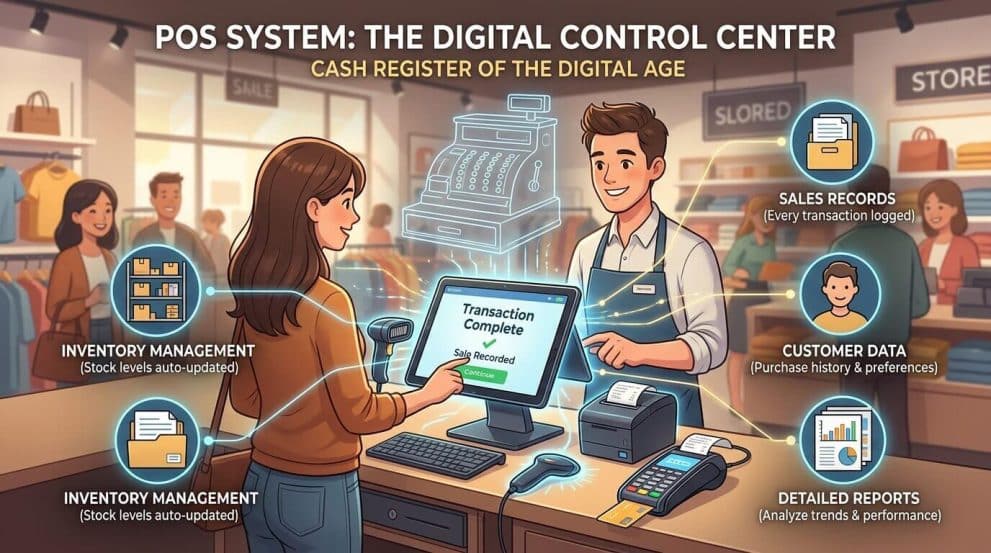
Think of it like the “cash register of the digital age.” But instead of just storing money and printing receipts, a POS system performs multiple business tasks at once. It records sales, manages inventory, tracks customer data, and generates detailed reports.
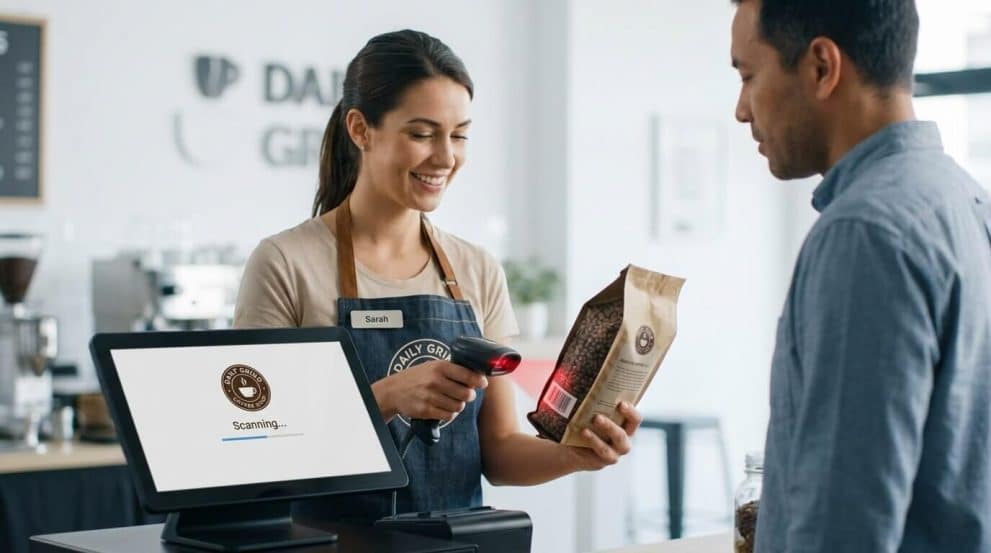
At the most basic level, a POS system consists of hardware and software working together. The hardware includes devices like barcode scanners, receipt printers, and payment terminals. The software processes the transaction, updates inventory, and records sales data.
In the past, businesses relied on manual cash registers. These systems were limited and only handled basic transactions. Modern POS systems, however, provide a full business management solution. They help business owners monitor sales trends, track product performance, and even analyze customer purchasing behavior.
Because of this transformation, the POS system has become the digital control center of modern retail and hospitality businesses.
What Is Point of Sale System in Business
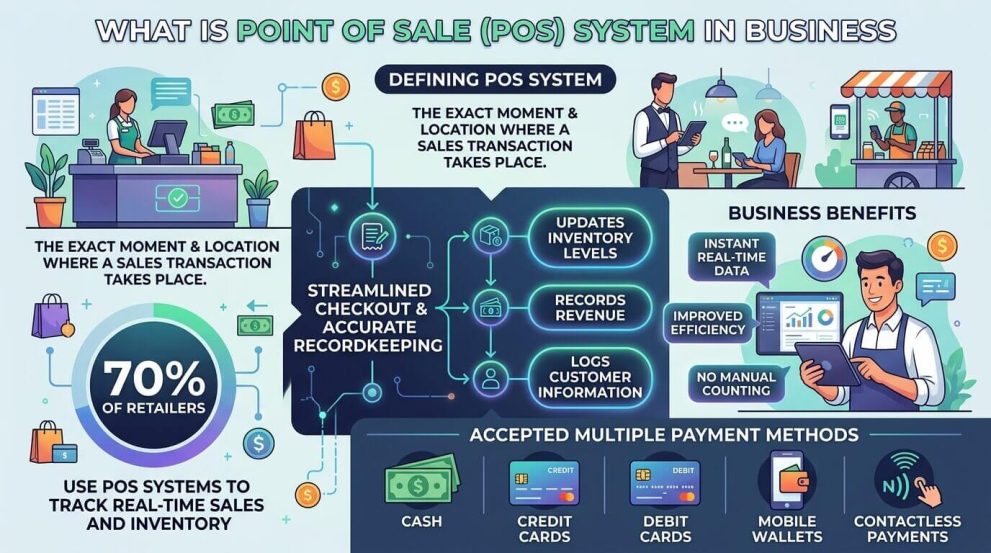
In a business context, the point of sale system is the exact moment and location where a sales transaction takes place. This could be a physical checkout counter in a store, a tablet used by a waiter in a restaurant, or even a mobile device used by a street vendor.
Businesses rely on POS systems to streamline the checkout process while ensuring accurate recordkeeping. Every sale automatically updates inventory levels, records revenue, and logs customer information.
This automation is extremely valuable for business operations. Instead of manually counting inventory or reviewing paper receipts, business owners can instantly access real-time data about their sales performance.
Research shows that around 70% of retailers use POS systems to track real-time sales and inventory, highlighting how essential these systems have become for operational efficiency.
POS systems also enable businesses to accept multiple payment methods such as:
Cash
Credit cards
Debit cards
Mobile wallets
Contactless payments
With consumer behavior shifting toward digital payments, modern POS systems ensure businesses remain competitive and capable of serving today’s tech-savvy customers.
POS System Explained for Beginners
If you are new to business technology, understanding how a POS system works might seem complicated at first. But when broken down, it becomes surprisingly simple.
A POS system is essentially a combination of hardware devices and software applications that work together to process transactions and manage business operations.
POS System Components Hardware Components
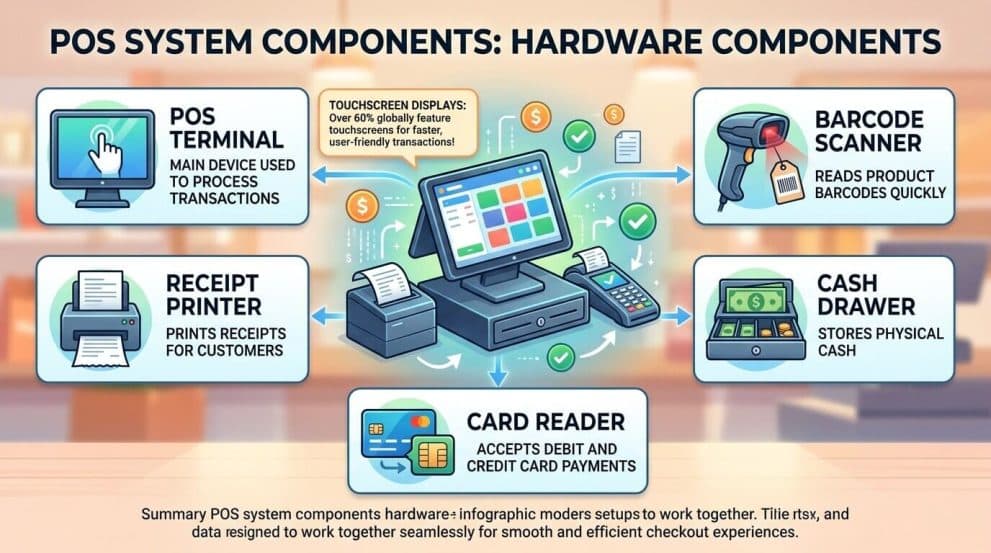
POS hardware includes the physical devices used during transactions. These components allow businesses to interact with customers and process payments efficiently.
Common POS hardware includes:
| Hardware Component | Function |
|---|---|
| POS Terminal | Main device used to process transactions |
| Barcode Scanner | Reads product barcodes quickly |
| Receipt Printer | Prints receipts for customers |
| Cash Drawer | Stores physical cash |
| Card Reader | Accepts debit and credit card payments |
Touchscreen POS terminals are becoming increasingly popular. In fact, about 60% of POS terminals shipped globally now feature touchscreen displays, making transactions faster and more user-friendly.
These devices are designed to work together seamlessly, ensuring smooth and efficient checkout experiences.
Software Components
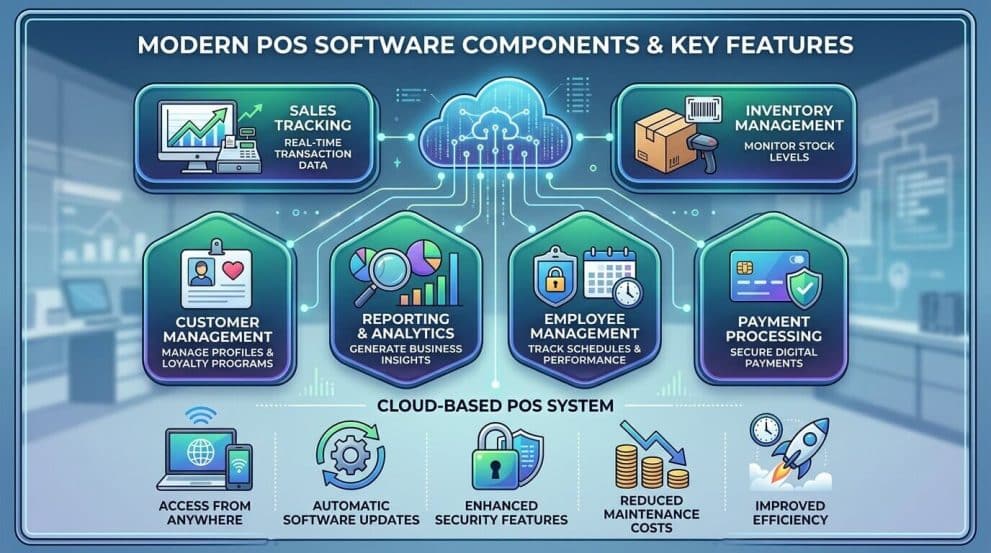
The software side of a POS system handles the digital operations behind the scenes. While the hardware processes payments and scans products, the software manages data and business insights.
Key POS software features typically include:
Sales tracking
Inventory management
Customer management
Reporting and analytics
Employee management
Payment processing
Many modern POS systems are cloud-based, meaning the data is stored online instead of on a local computer. This allows business owners to access reports and manage operations from anywhere.
Cloud POS systems also automatically update software and security features, reducing maintenance costs and improving efficiency.
How POS System Works in Business Step-by-Step POS Transaction Process
Understanding how POS system works becomes easier when you look at the transaction process step by step.
When a customer purchases a product, the following steps typically occur:
Product Selection
The customer selects items they want to buy.Item Scanning
The cashier scans the product barcode using the POS scanner.Price Display
The POS system retrieves product information from the database and displays the price.Payment Processing
The customer pays using cash, card, or digital wallet.Transaction Approval
The payment processor verifies and approves the transaction.Receipt Generation
The POS system prints or emails a receipt.Inventory Update
The system automatically reduces stock levels for the sold product.
This entire process typically takes just a few seconds. Mobile POS technology has made it even faster, reducing checkout time by up to 41% in some retail environments.
Example of POS System in Action
Imagine you walk into a coffee shop and order a cappuccino. The barista enters the order into a tablet POS system. Immediately, the system sends the order to the kitchen display, calculates the total price, and prompts you to pay.
You tap your contactless card, and within seconds the payment is processed. The POS system automatically records the sale, deducts the coffee beans and milk from inventory, and stores the transaction in the daily sales report.
Without a POS system, this process would involve manual calculations, handwritten receipts, and inventory tracking—all prone to errors.
This example shows why POS systems are essential for efficient business operations.
What Does a POS System Do
A modern POS system performs far more tasks than simply processing payments. It acts as a complete business management platform that integrates multiple operational functions.
Key Features of a POS System
A typical POS system includes several powerful features that help businesses operate more efficiently.
Some of the most important features include:
Sales Management: Records every transaction and tracks revenue.
Inventory Tracking: Automatically updates stock levels when items are sold.
Customer Management: Stores customer purchase history and preferences.
Employee Tracking: Monitors staff performance and working hours.
Reporting & Analytics: Generates reports on sales trends and product performance.
These capabilities allow business owners to gain valuable insights into their operations. For example, POS analytics can reveal which products sell the most, which hours are busiest, and which promotions attract the most customers.
This information empowers businesses to make smarter decisions, optimize pricing strategies, and improve customer experiences.
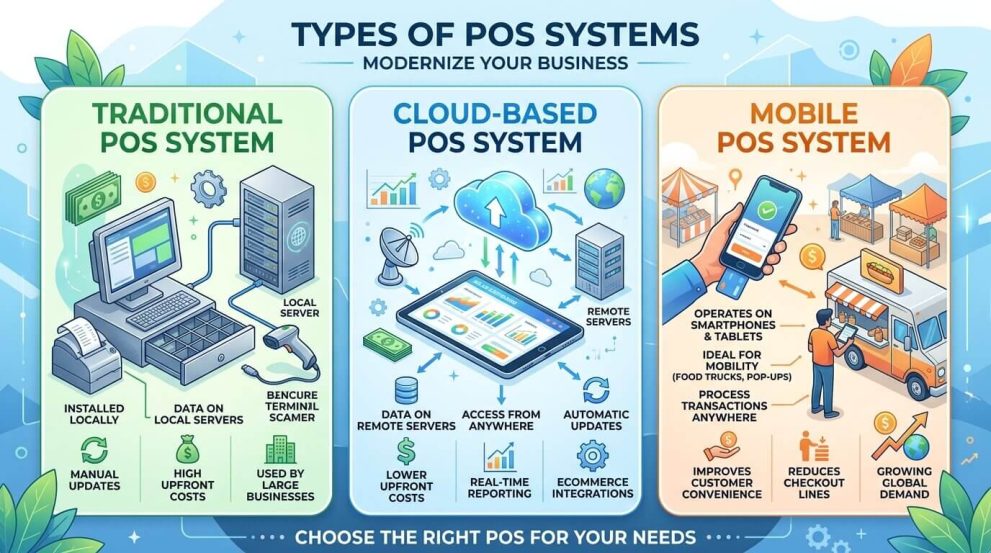
Types of POS Systems
Businesses today can choose from several types of POS systems depending on their needs and industry.
Traditional POS System
Traditional POS systems are installed locally on a computer or terminal within the business location. These systems store data on local servers and require manual updates.
They were widely used in the early days of retail technology and are still used by some large businesses with complex infrastructure.
However, traditional systems often require higher upfront costs and maintenance.
Cloud-Based POS System
Cloud-based POS systems store data on remote servers, allowing businesses to access information from anywhere with an internet connection.
These systems are extremely popular today. Studies show that over 60% of retailers now use cloud POS platforms, mainly due to their flexibility and lower upfront costs.
Cloud POS systems also support automatic updates, integrations with ecommerce platforms, and real-time reporting.
Mobile POS System
Mobile POS systems operate on smartphones or tablets. These systems are ideal for businesses that require mobility, such as food trucks, pop-up stores, and outdoor markets.
Mobile POS solutions allow employees to process transactions anywhere in the store or venue, improving customer convenience and reducing checkout lines.
The mobile POS market is expected to exceed $40 billion globally by 2026, reflecting the growing demand for flexible payment solutions.
Benefits of POS System for Businesses Increased Efficiency
One of the biggest benefits of a POS system is operational efficiency. Manual billing systems often involve human errors, slow transactions, and inaccurate records.
POS systems automate the entire process, ensuring transactions are processed quickly and accurately.
Faster checkout times lead to better customer experiences and shorter waiting lines. For busy stores and restaurants, this improvement can significantly boost daily revenue.
Better Inventory Control
Inventory management is one of the most challenging aspects of running a retail business. Without proper tracking, businesses may experience stock shortages or excess inventory.
POS systems solve this problem by automatically updating inventory whenever a sale occurs.
Some systems even provide alerts when stock levels fall below a certain threshold, helping businesses reorder products before they run out.
This real-time visibility improves efficiency and reduces inventory losses.
Data-Driven Decision Making
A POS system collects valuable data from every transaction. Over time, this data becomes a powerful tool for business decision-making.
For example, sales reports can reveal seasonal trends, customer preferences, and high-performing products.
Companies can use this information to:
Optimize pricing strategies
Launch targeted promotions
Improve product selection
Forecast future demand
Businesses that leverage POS analytics often experience improved profitability and more effective marketing strategies.
Industries That Use POS Systems
POS systems are used across many industries, not just retail stores. They have become essential tools in multiple sectors.
Common industries using POS systems include:
Retail stores
Restaurants and cafés
Hotels and hospitality
Grocery stores
Healthcare clinics
Entertainment venues
Retail remains the largest adopter, accounting for over 41% of global POS hardware sales.
Restaurants also rely heavily on POS technology to manage orders, payments, and kitchen communication.
How to Choose the Right POS System
Choosing the right POS system requires careful consideration of your business needs.
Important factors include:
Business size
Industry type
Payment options
Integration capabilities
Pricing and subscription fees
Small businesses often prefer cloud-based systems because they are affordable and easy to set up. Larger businesses may require advanced features such as multi-location management and detailed analytics.
Before selecting a POS system, businesses should evaluate their operational requirements and long-term growth plans.
Future Trends in POS Technology
The POS industry is evolving rapidly as technology advances.
The global POS market was valued at around $35.47 billion in 2025 and is expected to reach $124.7 billion by 2035, reflecting significant industry growth.
Some emerging trends include:
AI-powered POS analytics
Contactless and mobile payments
Self-checkout kiosks
Integration with ecommerce platforms
Biometric authentication
These innovations will continue transforming the retail and hospitality industries, making POS systems even more powerful and intelligent.
Conclusion
A POS system is far more than a payment machine—it is the backbone of modern business operations. From processing transactions to managing inventory and analyzing sales data, POS systems help businesses operate efficiently and deliver better customer experiences.
Understanding what a POS system is and how it works is essential for any business owner in today’s digital economy. As technology continues to evolve, POS systems will play an even bigger role in shaping the future of commerce.
For businesses aiming to grow, improve efficiency, and stay competitive, investing in the right POS system is not just helpful—it is essential.
FAQs
1. What is POS system in simple words?
A POS system is the place where a customer completes a purchase and pays for goods or services. It combines hardware and software to process payments, track sales, and manage inventory.
2. What does a POS system do in business?
A POS system processes transactions, manages inventory, tracks sales data, generates reports, and stores customer information to help businesses operate efficiently.
3. How does a POS system work?
A POS system scans product information, calculates the total price, processes payment, prints receipts, and automatically updates inventory and sales records.
4. What industries use POS systems?
POS systems are widely used in retail stores, restaurants, hotels, grocery stores, healthcare clinics, and entertainment venues.
5. Why is a POS system important for businesses?
A POS system improves efficiency, reduces errors, tracks inventory in real time, and provides valuable business insights through sales analytics.
Subscribe
To get news about new releases, Updates, Blog Post, Deals and Discounts
Like this content? Want to share it with others
Appsbd's Other Apps
Vitepos
We've built a fast and easy-to-use Point of Sale system for WooCommerce. It lets you manage your local and online stores in one app, saving you time and money while ensuring a seamless experience for your customers.

Vite Rewards
Vite Rewards is a comprehensive loyalty points plugin designed to incentivize customer engagement and boost sales on your WooCommerce store. With a wide range of features, ViteRewards allows you to reward customers for various actions and interactions, creating a more engaging shopping experience.

Elite Licenser
Elite Licenser is a top WordPress license manager plugin that controls software, plugin, theme, and app activations. Its premium feature protects against unauthorized usage.
Mini Cart Drawer
This plugin adds a customizable mini cart to your WooCommerce site, with an easy control panel and WP Customizer support. It also includes a sale booster that offers dynamic discounts like "Spend $20 more for a $2 discount," encouraging customers to buy more.

Vite Coupon
Vite Coupon is a comprehensive coupon management system designed to simplify the creation, distribution, and tracking of discount coupons for online businesses. This plugin integrates seamlessly with various e-commerce platforms, offering a user-friendly interface and robust features to enhance promotional strategies.

User & Kiosk App
Vitepos User App is an addon that lets customers place orders directly, making shopping and dining faster and more convenient. Guests can scan a table QR code to view menus and order without waiting for staff. Orders are instantly processed by the Vitepos Core App, ensuring smooth workflow. The app also supports kiosk devices for efficient self‑service stations.

Member Area
Support System
Best Support System, Best by name, Best by nature, Best by feature, it is a self-hosted customer support desk software. It handles support tickets, manages email tickets, collects any payment by PayPal.