

Appsbd

pos system cashier machine

The Complete & Proven Guide to Choosing a POS System Cashier Machine for Your Store

POS system cashier machine is the hardware and software setup that handles sales transactions at a store counter. Every time a customer pays — by card, cash, or mobile — a POS system cashier machine records the sale, calculates the total, processes payment, and produces a receipt.

This guide explains how a POS system cashier machine works, what the different types are, what components a full setup needs, and what to check before buying. It also covers Vitepos — a WooCommerce-based POS system cashier machine that handles all of this without requiring expensive dedicated hardware.

What Is a POS System Cashier Machine?

POS system cashier machine — point of sale system cashier machine — is the equipment at the checkout point of a store. At its core, it records a sale, calculates totals including tax, processes payment, and prints or sends a receipt.

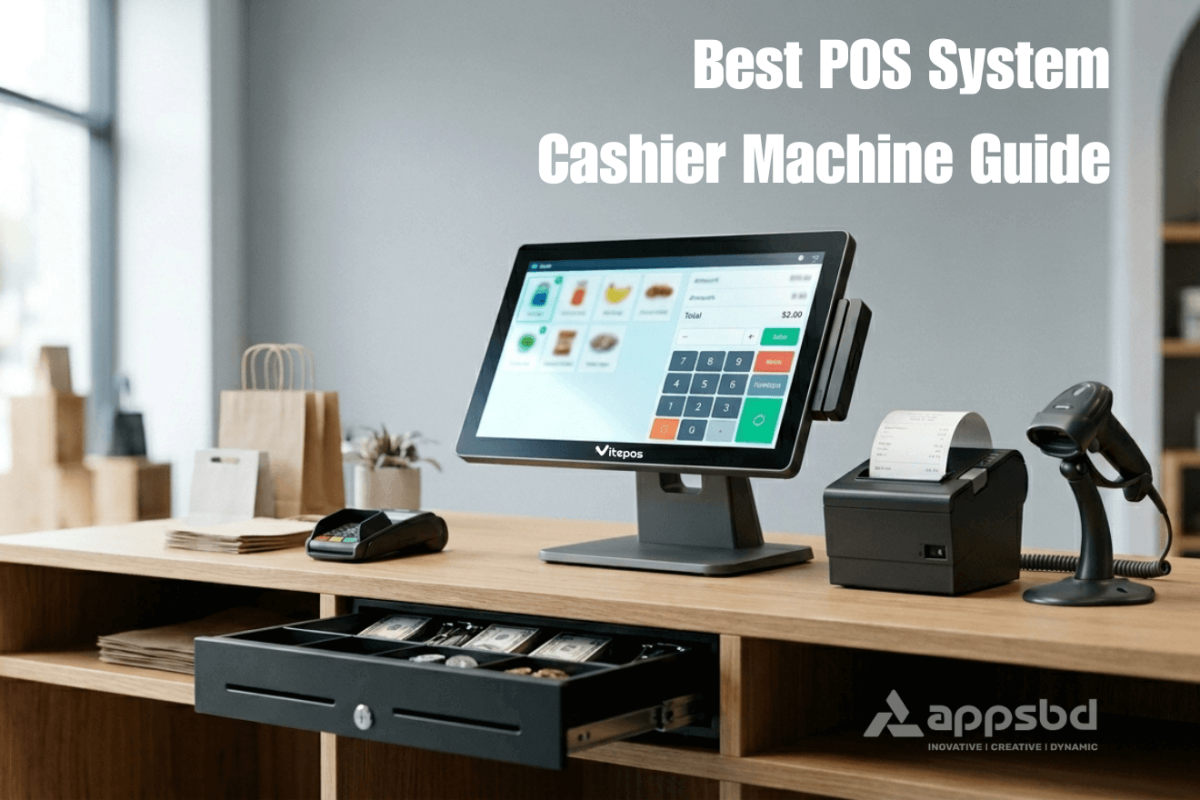
A complete POS system cashier machine setup typically includes:

  • A screen or monitor — touchscreen or standard display
  • POS software running on a computer, tablet, or dedicated device
  • A barcode scanner for product lookup
  • A receipt printer
  • A cash drawer
  • A card payment terminal

All components of a POS system cashier machine connect through USB, Bluetooth, or a local network. The software ties everything together, records each transaction in real time, and updates inventory automatically.

Modern POS system cashier machines go beyond just processing payments. They track inventory, manage multiple cashiers, generate sales reports, and sync online and offline orders — all from a single interface.

Types of POS System Cashier Machines

1. Traditional POS System

traditional POS system runs on a local machine or server installed inside the store. All transaction data stays on hardware the business owns. Large grocery stores and pharmacy chains often use a traditional POS system because it works without a stable internet connection and gives the business direct control over its data.

traditional POS system has higher upfront costs — hardware, software license, and sometimes IT installation fees. Ongoing monthly costs are lower or zero. The main limitation is that updates and remote management are harder compared to cloud-based options.

2. Cloud-Based POS System

A cloud-based POS system cashier machine stores data on remote servers and works from any internet-connected device. This is where Vitepos fits — it is a browser-based POS system cashier machine built on WooCommerce that runs on any device with a browser, including desktop PCs, tablets, and smartphones.

The key concern with cloud-based POS system cashier machines is internet dependency. Vitepos addresses this with a built-in offline mode — the system continues processing sales when the internet drops and syncs data when the connection returns.

3. Mobile POS

A mobile POS system cashier machine uses a smartphone or tablet paired with a card reader. This is common for market stalls and pop-up shops. Vitepos also works as a mobile POS system cashier machine — on an Android or iOS device, it uses the device camera as a barcode scanner, which removes the need for a separate scanner entirely.

4. Self-Service Kiosk POS

Large supermarkets use self-service kiosk POS system cashier machines where customers scan and pay without a cashier. These require specialized hardware and software and are not practical for most small or mid-sized stores.

Vitepos: A POS System Cashier Machine Built for WooCommerce Stores

Vitepos is a POS system cashier machine plugin developed by Appsbd, specifically built for WooCommerce and WordPress. Unlike generic POS systems that connect to WooCommerce through an external API bridge, Vitepos lives directly inside WordPress. This means it reads and writes to the WooCommerce database directly.

When a cashier scans a barcode and completes a sale on the Vitepos POS system cashier machine, the WooCommerce inventory updates instantly — no sync delay, no risk of overselling the same product in-store and online at the same time.

Vitepos is available in two versions: Vitepos Lite is free on WordPress.org with basic features. Vitepos Pro is a paid one-time purchase that unlocks split payments, offline orders, multi-color themes, advanced reporting, and more.

The POS system cashier machine interface in Vitepos shows a product grid with large images, a barcode scanner input field, quick-tap payment buttons, and a live cart. Cashiers can search products by name, scan barcodes with a connected scanner, or use the device camera on mobile.

Key Features of Vitepos as a POS System Cashier Machine

Offline Mode

Vitepos continues processing sales when the internet drops. Transactions queue locally and sync when the connection returns.

Inventory Sync

WooCommerce stock immediately across all outlets and the online store simultaneously.

Barcode Generator

Generate and print barcodes for products directly from the pos system cashier machine panel no third-party tool needed.

Split Payment

Customers can pay part in cash and part by card in a single transaction — a feature most traditional pos systems do not include.

Customer Display

A second screen or tablet can show the customer their itemized bill in real time during checkout.

Restaurant Mode

Manage table-wise orders, print kitchen slips, and handle pay-first or traditional dining from the same interface.

Multiple Outlets

Manage unlimited store outlets and counters from one dashboard. Assign different cashiers per outlet or counter.

Role-Based Access

Create Cashier, Manager, and Admin roles with specific permissions. Each user only sees what they need.

Vitepos also includes a customer hold queue — if a customer takes time to decide on payment, the cashier can place their cart on hold without losing data, then serve the next customer and return to complete the held order.

Hardware Compatibility: What You Need for a Vitepos POS System Cashier Machine Setup

One practical advantage of Vitepos as a POS system cashier machine is that it runs entirely in a web browser. This means it works on any device that has a browser — Windows PC, Mac, iPad, Android tablet, or smartphone. You are not locked into buying proprietary hardware.

Compatible peripherals for a Vitepos POS system cashier machine setup include:

  • Any thermal receipt printer supported by your device’s browser (Epson, Star Micronics, Bixolon, and others)
  • Any USB or Bluetooth barcode scanner — or the device’s own camera on mobile
  • Any cash drawer that connects to the receipt printer
  • Any card payment terminal, including Stripe Terminal for integrated in-person card payments
  • A second display or tablet for the customer-facing screen

This hardware-agnostic approach makes the Vitepos POS system cashier machine significantly cheaper to set up than traditional retail systems that require specific branded hardware. If you already have a computer and a printer at your counter, you may only need to add a barcode scanner and a card terminal.

Convenience Store POS System: Can Vitepos Handle It?

convenience store POS system has requirements that go beyond standard retail — age verification prompts, fuel pump control, tobacco inventory tracking, and lottery ticket sales are common needs. Vitepos does not include built-in fuel pump integration, which makes it less suited to gas station forecourt management.

However, for a general convenience store POS system that sells packaged goods, beverages, snacks, and similar products, Vitepos works well. It handles high transaction volumes, barcode scanning, multiple payment types, real-time inventory, and outlet-level stock tracking — all of which are core requirements for convenience retail.

If your convenience store also runs an online WooCommerce shop alongside the physical counter, Vitepos is a direct fit as your convenience store POS system. The same product catalog, pricing, and stock are shared between the online store and the in-store POS system cashier machine without any manual sync.

Vitepos vs Traditional POS System

The main difference between Vitepos and a traditional POS system is where the software lives and how it is priced.

traditional POS system runs on local hardware, requires IT installation, and has high upfront costs with low ongoing fees. Vitepos runs in a browser, installs like any WordPress plugin, and has a one-time Pro fee with no monthly subscription charge from the plugin itself.

traditional POS system generally works without the internet. Vitepos also works without the internet via its offline mode — though it is designed as a primarily online system. If your store has consistently unreliable internet with no fallback, a traditional POS system on local hardware is more reliable. If your internet is stable with occasional drops, Vitepos offline mode handles those gaps.

The biggest practical difference: a traditional POS system does not sync with a WooCommerce online store natively. If you sell both online and in-store, you need a separate integration layer. Vitepos eliminates this problem entirely because it is built inside WooCommerce.

Store Systems Support: What Vitepos Offers

Reliable store systems support is one of the most practical things to evaluate when choosing a POS system cashier machine. A system that breaks down during trading hours without accessible support creates real business problems.

Vitepos provides store systems support through its official website at vitepos.com and through the WordPress.org support forums for the Lite version. Pro users get priority support. The plugin has an active development team — the changelog shows consistent updates and the AppSumo community reviews note responsive support from the Vitepos founder directly.

Because Vitepos runs on WordPress, your existing WordPress developer or hosting provider can also assist with basic setup and troubleshooting — a layer of store systems support that standalone POS vendors cannot offer.

Inventory Management in a Vitepos POS System Cashier Machine

Every sale processed through the Vitepos POS system cashier machine deducts stock from WooCommerce inventory in real time. You can see stock levels across all outlets and the online store from a single dashboard.

Vitepos has two inventory modes. The first keeps a unified stock across all outlets and the online store — one product pool shared everywhere. The second is outlet-wise stock management, where each physical location has its own separate stock count. You can also transfer stock from one outlet to another directly through the POS system cashier machine admin panel.

The vendor and purchase module in Vitepos lets you record incoming stock from suppliers, generate barcodes for new products, and accept or reject stock transfers between outlets — all within the same POS system cashier machine interface.

Pricing: Vitepos POS System Cashier Machine Cost

Vitepos Lite is free. It covers basic POS system cashier machine functionality including barcode scanning, cash payments, basic inventory, and single outlet management.

Vitepos Pro is a Yearly start from $79 and one-time payment $299 — no monthly fee from the plugin itself. Pro unlocks split payments, offline order processing, multi-outlet stock management, advanced reporting, multi-color themes, Stripe Terminal integration, and priority store systems support.

Compare this to alternatives:

  • Square charges 2.6% + $0.15 per in-person transaction plus monthly fees for advanced features. It does not connect natively to WooCommerce.
  • Shopify POS Pro costs $89 per location per month and requires your store to run on Shopify, not WooCommerce.
  • Lightspeed Retail starts at around $89/month per location.

For a WooCommerce store that already has hosting and WordPress running, the Vitepos POS system cashier machine adds in-person retail capability at a fraction of the ongoing cost of most alternatives.

Setting Up a Vitepos POS System Cashier Machine

  1. Install the plugin. Install Vitepos from WordPress.org (Lite) or upload the Pro version via the WordPress dashboard. Activate it like any other plugin.
  2. Configure your outlet. Create your store outlet in the Vitepos settings. Set the outlet name, location-based tax rules, and assign a cashier user.
  3. Connect your hardware. Pair your receipt printer, barcode scanner, and cash drawer through the browser settings. Most thermal printers and USB scanners connect without additional drivers.
  4. Set payment methods. Enable cash, card, bank transfer, mobile banking, or Stripe Terminal depending on what your store accepts.
  5. Import your product catalog. Vitepos uses your existing WooCommerce product catalog. If your products are already in WooCommerce, they appear in the POS system cashier machine interface immediately with no re-import needed.
  6. Run a test sale. Process a test transaction to confirm the printer fires, the cash drawer opens, and stock updates in WooCommerce.

For a store that already runs WooCommerce, the full Vitepos POS system cashier machine setup typically takes a few hours rather than the one to two days required for most traditional POS systems.

Ready to try Vitepos? The free Lite version is available on WordPress.org. For a WooCommerce store that also sells in person, it is the fastest way to get a working POS system cashier machine running without buying new hardware or paying monthly software fees.

FAQ: POS System Cashier Machine

A POS system cashier machine is the hardware and software combination used at a store checkout to process sales. It records transactions, calculates totals and tax, handles payment, updates inventory, and prints or sends a receipt. Modern POS system cashier machines like Vitepos also sync with online stores and generate sales reports.
 
Vitepos is built directly inside WooCommerce rather than connecting through a third-party API. This means every sale at the POS system cashier machine updates WooCommerce stock and orders in real time with no sync delay. It also has a one-time Pro pricing model, works on any browser-capable device without proprietary hardware, and includes an offline mode for continuous operation during internet outages.
Yes. Vitepos has a built-in offline mode. When the internet drops, the POS system cashier machine continues processing sales locally. Transactions queue and sync to WooCommerce when the connection returns. This makes it usable in stores with occasional connectivity issues, though it is not a full replacement for a traditional POS system in locations with persistently unreliable internet.
Vitepos works well as a convenience store POS system for general retail — packaged goods, beverages, snacks, and similar products. It handles high transaction volumes, barcode scanning, multiple payment types, and real-time inventory. It does not include built-in fuel pump integration, so it is not suited to gas station forecourt management without additional tools.
 
Vitepos runs in any web browser, so any computer, tablet, or smartphone works as the main terminal. For a full counter setup, you need a thermal receipt printer, a barcode scanner (or use a mobile device camera), and a cash drawer connected to the printer. Vitepos is compatible with Stripe Terminal for integrated card payments. No proprietary branded hardware is required.
 
Vitepos supports unlimited outlets and counters. You can manage all locations from one dashboard, assign different cashiers per outlet, set location-based tax rules per outlet, and choose between unified stock across all outlets or separate stock per outlet. Stock transfers between outlets are handled within the same POS system cashier machine interface.
 
A traditional POS system runs on local hardware inside the store with no cloud component. Vitepos is browser-based and cloud-connected through WooCommerce. The main advantages of Vitepos over a traditional POS system are lower hardware cost, native WooCommerce integration, and easier setup. The main advantage of a traditional POS system is that it works fully offline and does not depend on any internet connection.
 
Yes. Vitepos Lite is free and available on WordPress.org. It covers basic POS system cashier machine functions including barcode scanning, cash payment, and single outlet management. Vitepos Pro is a one-time paid upgrade that adds split payments, offline order processing, outlet-wise stock management, Stripe Terminal support, and priority store systems support.

Subscribe

To get news about new releases, Updates, Blog Post, Deals and Discounts

Like this content? Want to share it with others

Appsbd's Other Apps

Vitepos

Vitepos

We've built a fast and easy-to-use Point of Sale system for WooCommerce. It lets you manage your local and online stores in one app, saving you time and money while ensuring a seamless experience for your customers.

Vite Rewards

Vite Rewards

Vite Rewards is a comprehensive loyalty points plugin designed to incentivize customer engagement and boost sales on your WooCommerce store. With a wide range of features, ViteRewards allows you to reward customers for various actions and interactions, creating a more engaging shopping experience.
Elite Licenser

Elite Licenser

Elite Licenser is a top WordPress license manager plugin that controls software, plugin, theme, and app activations. Its premium feature protects against unauthorized usage.
Mini Cart Drawer

Mini Cart Drawer

This plugin adds a customizable mini cart to your WooCommerce site, with an easy control panel and WP Customizer support. It also includes a sale booster that offers dynamic discounts like "Spend $20 more for a $2 discount," encouraging customers to buy more.

Vite Coupon

Vite Coupon

Vite Coupon is a comprehensive coupon management system designed to simplify the creation, distribution, and tracking of discount coupons for online businesses. This plugin integrates seamlessly with various e-commerce platforms, offering a user-friendly interface and robust features to enhance promotional strategies.

User & Kiosk App

User & Kiosk App

Vitepos User App is an addon that lets customers place orders directly, making shopping and dining faster and more convenient. Guests can scan a table QR code to view menus and order without waiting for staff. Orders are instantly processed by the Vitepos Core App, ensuring smooth workflow. The app also supports kiosk devices for efficient self‑service stations.

Member Area
Member Area

Members Area is a private section for registered users to manage licenses and view details. It also supports coupon management on platforms like AppSumo and PitchGround, with tools to create, import, export, and generate unique codes easily.
Support System

Support System

Best Support System, Best by name, Best by nature, Best by feature, it is a self-hosted customer support desk software. It handles support tickets, manages email tickets, collects any payment by PayPal.


Subscribe
Notify of
guest
0 Comments
Oldest
Newest Most Voted
Inline Feedbacks
View all comments

0
Would love your thoughts, please comment.x
()
x