

Cart Abandonment vs Coupon Strategy: Which Converts More?
Written by Md Ferdous Hassan Alin. Posted in Coupon, WooCommerce, WordPress No Comments
Most online stores lose more visitors than they keep. A shopper adds a product to the cart, looks at the total, and leaves. The store owner then has two broad options. One is to find out why people leave and fix it. The other is to offer a discount and hope it brings them back.
This is the real question behind “cart abandonment vs coupon strategy.” The two are not competing options. Cart abandonment is the problem, and a coupon strategy is one possible response to it. The useful question is which response converts more for your store, and under what conditions.
This article explains how cart abandonment is measured and why it happens. It then covers what a coupon strategy can and cannot fix, how to diagnose your own store, and how to combine both approaches in WooCommerce. It also covers where a plugin such as Vite Coupon fits.
What Is Cart Abandonment?
Cart abandonment happens when a shopper adds products to an online cart and leaves without buying. The cart abandonment rate is the share of those carts that never become orders.
The formula is simple:
Cart abandonment rate = (carts created − completed purchases) ÷ carts created × 100
For example, if 1,000 carts were created last month and 300 became orders, 700 were abandoned. The cart abandonment rate is 70%.
The Baymard Institute has collected data from dozens of studies and puts the average documented rate at about 70%. You can read the list on <a href=”https://baymard.com/lists/cart-abandonment-rate” target=”_blank” rel=”nofollow noopener”>Baymard Institute’s cart abandonment statistics page</a>. Your own rate will differ by industry, price level, device mix, and traffic source. A store selling low-cost consumables will usually see a different number from one selling furniture.
Two points help when you read any cart abandonment rate:
- Not every abandoned cart is a lost sale. Baymard’s survey data separates people who were “just browsing” from people who hit a problem at checkout. In its 2022 survey, a majority of US shoppers who had abandoned a cart in the previous three months said they were not ready to buy. Many of those shoppers use the cart as a wishlist or a price calculator.
- The rate depends on how you count. Some tools count carts, others count sessions. Pick one method and keep it consistent, or your trend line will not mean anything.
Why Cart Abandonment Happens
A coupon strategy only helps if price is part of the reason shoppers leave. So the first step is to separate price-related reasons from everything else.
Baymard’s survey of US online shoppers asked people why they abandoned a checkout. Setting aside the “just browsing” group, the main reasons in its 2022 data were:
| Reason for abandoning checkout | Approximate share of shoppers | Is a coupon likely to help? |
|---|---|---|
| Extra costs too high (shipping, tax, fees) | 48% | Sometimes. Free shipping or a threshold offer may help more than a percentage discount. |
| Site required creating an account | 26% | No. Guest checkout is the fix. |
| Did not trust the site with card details | 25% | No. Trust signals and secure payment are the fix. |
| Checkout was too long or complicated | 22% | No. Simplify the form. |
Percentages come from Baymard Institute survey data as reported in its research, and respondents could choose more than one reason, so the figures do not add to 100%.
Only the first reason has a direct link to price. Even there, the complaint is about unexpected cost, not about the product price itself. A shopper who sees a shipping fee for the first time at the final step is surprised. A coupon that cuts 10% off the product does not remove the surprise.
Common causes beyond the survey list
Other causes show up in store analytics and support tickets:
- Slow pages, especially on mobile connections.
- Limited payment methods. Shoppers leave when their preferred method is missing.
- Unclear delivery times or return policy.
- Coupon field confusion. A visible “Enter coupon code” box can send shoppers to a search engine to look for a code, and many do not come back.
- Out-of-stock or low-stock errors at the last step.
- Comparison shopping. The shopper plans to buy but wants to check one more store.
- Technical bugs, such as a payment gateway timeout or a broken shipping calculator.
Each of these has a different fix. This is why a coupon strategy alone does not reduce cart abandonment across the board.
What Is a Coupon Strategy?
A coupon strategy is a plan for when, to whom, and in what form you offer discounts. It covers more than a discount code in an email.
A workable coupon strategy answers these questions:
- Goal. Are you trying to win back abandoned carts, raise average order value, clear stock, or reward repeat buyers?
- Audience. Does the offer go to everyone, to first-time buyers, or to a segment such as returning customers?
- Offer type. Percentage off, fixed amount, free item, free shipping, or a conditional deal?
- Conditions. Is there a minimum spend, a product or category limit, or an expiry date?
- Delivery. Is the code shown on the site, sent by email, or applied automatically through a link?
- Limits. How many times can the code be used, and by whom?
- Measurement. How will you know whether the offer produced profit, not just orders?
The last point is the one stores skip most often. A coupon that raises conversion by two points but cuts margin by fifteen can lose money.
Cart Abandonment vs Coupon Strategy: Direct Comparison
The two ideas sit at different levels, so it helps to compare what each one does.
| Factor | Fixing causes of cart abandonment | Coupon strategy |
|---|---|---|
| What it targets | The reasons shoppers leave | The shopper’s price sensitivity |
| Cost to the store | Development or design time, usually one-time | Lost margin on every redeemed discount |
| Speed to result | Slower. Needs diagnosis and changes. | Faster. A code can go live in minutes. |
| Scope | Helps every shopper who hits the problem | Helps shoppers who respond to price |
| Risk | Change may introduce new bugs | Trains shoppers to wait for discounts |
| Repeatable | Yes, the gain stays | Only while the offer runs |
From this table, the honest answer to “which converts more” is conditional:
- If shoppers leave because of friction or trust, fixing those causes converts more, and a coupon will not help.
- If shoppers leave because of price sensitivity or comparison shopping, a well-targeted coupon strategy converts more.
- If the cause is unexpected costs, a clearer cost display or a free-shipping threshold is often a better first step than a percentage coupon.
I have not found a controlled, publicly available study that compares the two approaches head to head across many stores, so I will not give you a single winner. The only reliable method is to test on your own store, which the diagnosis section below covers.
When Coupons Convert Well
Coupons tend to work in these situations:
- The shopper was already close to buying. A returning visitor with a full cart and a long consideration time may need a small push.
- Your price is close to a competitor’s. A modest, time-limited offer can tip a comparison.
- You want to raise order value. A conditional offer, such as a discount on a second item when the cart passes a set amount, can increase basket size.
- You are launching or clearing stock. Scheduled offers can match a sales calendar.
- You want to move shoppers from one channel to another. A link-based coupon in an email or social post applies the discount without typing a code.
When Coupons Do Not Convert
Coupons usually fail, or cost more than they return, in these situations:
- The checkout is broken or confusing. A discount cannot fix a payment error.
- Shoppers do not trust the store. A lower price on a site that feels unsafe can make the doubt worse.
- The discount is always available. If every visitor sees a pop-up code on arrival, the code stops being an incentive and becomes the new price.
- The coupon field invites code hunting. An empty, prominent coupon box can send shoppers off-site to search for codes.
- The margin cannot absorb it. Products with thin margins can turn a “successful” campaign into a loss.
How to Diagnose Your Own Store
Before you choose between fixing friction and offering discounts, work out where shoppers leave. These steps use data most stores already have.
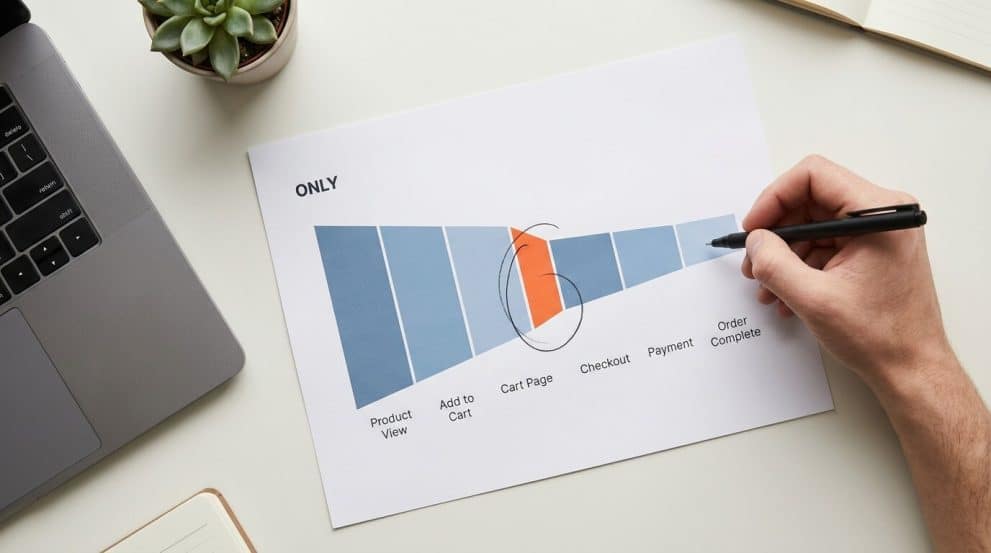
Step 1: Map your checkout funnel
List each stage and count how many sessions reach it:
- Product page view
- Add to cart
- Cart page view
- Checkout started
- Payment step reached
- Order completed
Google Analytics 4 and WooCommerce’s built-in analytics can both give you most of these numbers. The stage with the largest drop is where to look first.
Step 2: Read the drop-off pattern
- Large drop between product page and add to cart: this is a product-page problem (price, images, description), not a cart problem.
- Large drop between cart and checkout: often caused by surprise costs, unclear shipping, or a missing guest checkout option.
- Large drop at the payment step: often caused by missing payment methods, trust concerns, or technical errors.
Step 3: Check device splits
Compare desktop and mobile. If mobile abandonment is much higher, test your checkout on a real phone. Look for small tap targets, slow loading, and form fields that trigger the wrong keyboard.
Step 4: Look at real sessions and messages
Session recordings, support emails, and live chat logs show things analytics cannot. If several customers ask “Is shipping included?”, you have found a cost-transparency problem.
Step 5: Run a small test
If your data points to price sensitivity, run a controlled test:
- Show a defined offer to half of your eligible visitors and nothing to the other half.
- Run it long enough to collect a meaningful number of orders.
- Compare profit per visitor, not only conversion rate.
This is the only way to know whether a coupon strategy pays for itself in your store.
Possible Solutions: A Combined Approach
For most stores, the best result comes from doing both, in a set order.
Fix the friction first
These changes cost nothing in margin:
- Show shipping and tax estimates early, on the product or cart page.
- Offer guest checkout.
- Remove optional form fields.
- Add the payment methods your customers actually use.
- Display return policy and delivery times near the buy button.
- Test page speed on mobile.
- Show a persistent, quick-view cart so shoppers can review items without leaving the page. A tool such as <a href=”https://appsbd.com/products/mini-cart-drawer-for-woocommerce/?utm_source=appsbd&utm_medium=blog&utm_campaign=cart-abandonment-vs-coupon-strategy-which-converts-more” target=”_blank”>Mini Cart Drawer</a> adds a slide-out cart for WooCommerce stores.
Add a targeted coupon strategy second
Once friction is reduced, a coupon strategy can address the shoppers who still hesitate on price. Use offers that match the cause:
- Unexpected shipping cost: a free-shipping threshold or a shipping-related coupon.
- Price comparison: a small, time-limited percentage or fixed discount.
- Low order value: a conditional offer that rewards a larger basket.
- Returning customers: a loyalty offer rather than a public discount.
Keep offers specific and limited
Set an expiry, a usage limit, and a clear condition. A scheduled offer that ends on a known date creates a reason to act, without turning the discount into the standard price.
Coupon Types That Fit Abandonment Scenarios
The table below matches common situations with coupon formats. These are general WooCommerce practices, and not every plugin supports every type.
| Situation | Coupon format | Why it fits |
|---|---|---|
| Shopper hesitates on a single item | Small percentage or fixed discount | Simple, easy to understand |
| Cart value is slightly below free-shipping level | Free-shipping threshold or minimum-spend offer | Encourages adding one more item |
| Shopper bought once and left a second cart | Returning-customer coupon | Rewards loyalty without discounting for all |
| You want larger baskets | Buy-one-get-one or buy-many-get-many offer | Raises items per order |
| Promotion tied to a campaign | URL coupon with a start and end date | Applies when the shopper clicks the link |
| Gift or prepaid use | Store-credit voucher | Moves spending to your store |
How Vite Coupon Fits Into a Coupon Strategy
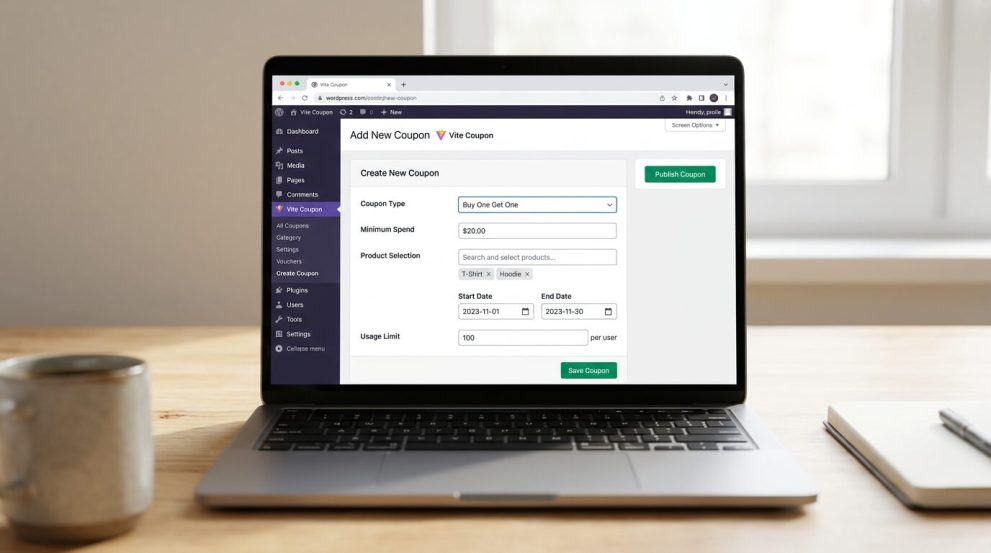
If you run WooCommerce, you can set up many of these offers with a coupon plugin. Vite Coupon is a WordPress plugin for creating and managing coupons and vouchers. According to its product page, it works with both WooCommerce and Vitepos, the point-of-sale system from the same company. The details below come from that page.
Coupon types listed on the product page
The plugin lists these coupon types:
- Up to discount: a percentage off up to a set limit.
- Buy One Get One (BOGO), Buy Two Get One (BTGO), Buy One Get Two (BOGT), and Buy Many Get Many (BNGN).
- Conditional BOGO and Conditional BNGN, where terms such as minimum spend or selected products apply.
- Anytime scheduler: coupons that run on a schedule.
- URL coupons: a discount that applies when the shopper clicks a specific link.
- WooCommerce default coupons, such as percentage and fixed discounts on the cart or on products.
- Advanced conditions: rules that control when a coupon applies.
Features that relate to cart abandonment
Several of these features connect directly to the causes covered above:
- Auto-apply. The product page FAQ states that coupons can be set to apply automatically at checkout without the shopper entering a code. This addresses the problem of shoppers leaving to search for codes.
- Click-to-apply from the cart page. The FAQ also states that shoppers can click to apply a coupon from the cart page.
- URL coupons. A link in an email, social post, or ad can carry the discount, so the shopper does not need to type anything.
- Conditions. You can limit a coupon to a minimum spend or to selected products, which protects margin and supports order-value goals.
- Scheduling. You can define when an offer starts and ends.
- Vouchers. Version 2.0.0, listed in the product’s change log with a July 2026 date, added a voucher module. Vouchers act as store credit with a fixed value, an expiry date, partial redemption, and balance tracking. They can be gifted, and they work across WooCommerce and Vitepos checkout.
- Pricing tiers. The product page lists a free Lite plan and paid yearly or lifetime plans. All plans list the same core feature set, including voucher management. Check the page for current prices, since promotions change.
What the plugin does not claim to do
The product page does not list abandoned cart emails, cart tracking, or automated recovery messages. If you want to send reminder emails to shoppers who leave, you will need a separate cart recovery tool or an email platform. Vite Coupon then supplies the offer, and the other tool delivers the message.
Where Vite Coupon is a reasonable fit
- You run WooCommerce and want several coupon formats in one plugin.
- You sell both online and in a physical shop through Vitepos and want one set of codes across both.
- You want conditions and schedules to control margin.
- You want to issue gift vouchers or store credit.
Where it may not be enough
- You need automatic abandoned cart emails with tracking built in.
- Your cart abandonment comes mainly from friction or trust problems that no coupon can fix.
Other tools from the same company can support the wider plan. For example, Vite Rewards is described as a points-based loyalty program, which is useful if you want to reward repeat buyers instead of discounting for everyone. Elite Notification is described as a social proof tool, which relates to the trust problem.
Step-by-Step: Building a Cart-Focused Coupon Strategy in WooCommerce
This sequence works with any WooCommerce coupon tool. It uses Vite Coupon’s listed features as the example.
Step 1: Set one goal
Choose a single goal for the first campaign. Examples: raise average order value by a set amount, or win back shoppers who left at the cart page.
Step 2: Pick the segment
Decide who sees the offer. A segment such as “returning customers with a cart above a set value” costs far less margin than “everyone.”
Step 3: Choose the coupon type
Match the type to the cause. If shoppers leave because they compare prices, a small percentage or fixed discount fits. If you want larger baskets, a conditional BOGO or BNGN offer fits better.
Step 4: Set conditions and limits
Add a minimum spend, eligible products, a per-customer limit, and a total usage cap. These rules protect margin and reduce abuse.
Step 5: Schedule the offer
Set a start and end date. Short, defined windows work better than open-ended offers because shoppers see a reason to act now.
Step 6: Choose how the shopper receives it
You have three main options:
- Auto-apply at checkout when conditions are met.
- Click-to-apply on the cart page.
- URL coupon in an email or ad.
Each option removes the need for the shopper to type or find a code.
Step 7: Test as a customer
Before launch, place a test order on desktop and on a phone. Check that the discount shows clearly, applies correctly, and matches the conditions. Test an ineligible cart to confirm the coupon does not apply.
Step 8: Measure and compare
After the campaign, compare against the baseline:
- Orders from the offer
- Average order value
- Margin after discount
- Share of buyers who would likely have bought anyway
- Change in the cart abandonment rate
Common Mistakes to Avoid
- Offering a discount before diagnosing the cause. If the real problem is a broken checkout, the coupon costs margin and changes nothing.
- Showing a coupon to every visitor. Always-on offers become the expected price.
- Ignoring margin. Calculate profit per order after the discount, including shipping and fees.
- Leaving offers without an expiry. Open-ended codes spread to coupon sites.
- Skipping usage limits. One shared code can drain a campaign budget.
- Stacking discounts by accident. Check how your coupons combine with sale prices and other codes.
- Measuring only conversion rate. A higher rate with lower profit is not a win.
- Testing only on desktop. Many coupon fields and cart pages behave differently on phones.
- Using the same offer for new and loyal customers. A loyal buyer may not need a discount to return.
- Not testing the coupon after plugin or theme updates. Updates can change how cart rules run.
Additional Tips
- Show the full cost early. A shipping estimator on the cart page often does more than a discount for shoppers who dislike surprises.
- Hide the coupon field if you do not need it. If you use auto-apply or URL coupons, a prominent empty box may send shoppers off to look for codes.
- Use expiry dates honestly. Real deadlines work. Fake countdowns damage trust.
- Pair coupons with trust signals. Clear return terms, visible contact details, and recognizable payment logos help hesitant shoppers.
- Offer vouchers for gift buyers. A prepaid voucher can bring in new customers through gifting, without discounting your products.
- Review once a month. Check which offers still produce profit and retire the ones that do not.
When Professional or Technical Help May Be Needed
Some situations are hard to solve with plugin settings alone:
- Your checkout shows errors, timeouts, or inconsistent totals.
- Coupon rules conflict with custom pricing, wholesale rules, or third-party plugins.
- You need coupons and stock to sync between an online store and physical locations.
- You need cart tracking and automated recovery emails built to your specifications.
In these cases, contact the plugin’s support team or a WooCommerce developer. Appsbd lists a custom development contact on the Vite Coupon page.
Frequently Asked Questions
They can, but only for shoppers who leave because of price or comparison shopping. Coupons do not help shoppers who leave because of forced account creation, a complicated checkout, or trust concerns. Check your funnel data before relying on a discount.
There is no single best option. A targeted approach tends to cost less than a blanket discount. Choose a coupon type that matches the cause, add a minimum spend or product condition, set an expiry date, and measure profit per visitor.
Show total costs early, offer guest checkout, shorten the checkout form, add common payment methods, speed up mobile pages, and display return and delivery information near the buy button. These changes do not reduce margin.
The Vite Coupon product page does not list abandoned cart email features. It provides coupon and voucher creation, conditions, scheduling, URL coupons, and auto-apply. For automated reminder emails, use a separate cart recovery or email tool and supply the offer from your coupon plugin.
WooCommerce has built-in coupon support for percentage and fixed discounts. For more formats, such as BOGO, conditional offers, scheduled coupons, and vouchers, you can use a coupon plugin such as Vite Coupon.
The Baymard average is around 70%, but your target depends on your industry and price level. Compare your rate to your own history first. A steady downward trend after specific changes is a better signal than matching an average.
Conclusion
Cart abandonment and coupon strategy do not compete. Cart abandonment is the result, and a coupon strategy is one tool for changing it. Fixing the causes of cart abandonment converts more when shoppers leave because of friction, trust, or surprise costs. A coupon strategy converts more when the shopper is already interested and only price stands in the way.
The practical order is simple. Measure where shoppers leave, fix the friction that costs you nothing, then add a narrow, time-limited coupon strategy for the shoppers who remain price-sensitive. Test every offer against profit, not only conversion.
If you run WooCommerce and need several coupon formats, conditions, schedules, and vouchers in one place, Vite Coupon is one option to evaluate. It has a free Lite plan, so you can test the setup before paying.
Subscribe
To get news about new releases, Updates, Blog Post, Deals and Discounts