

How to Set Up a Points & Rewards System from Scratch in WooCommerce
Written by Md Ferdous Hassan Alin. Posted in Rewards Plugin, WooCommerce, WordPress No Comments
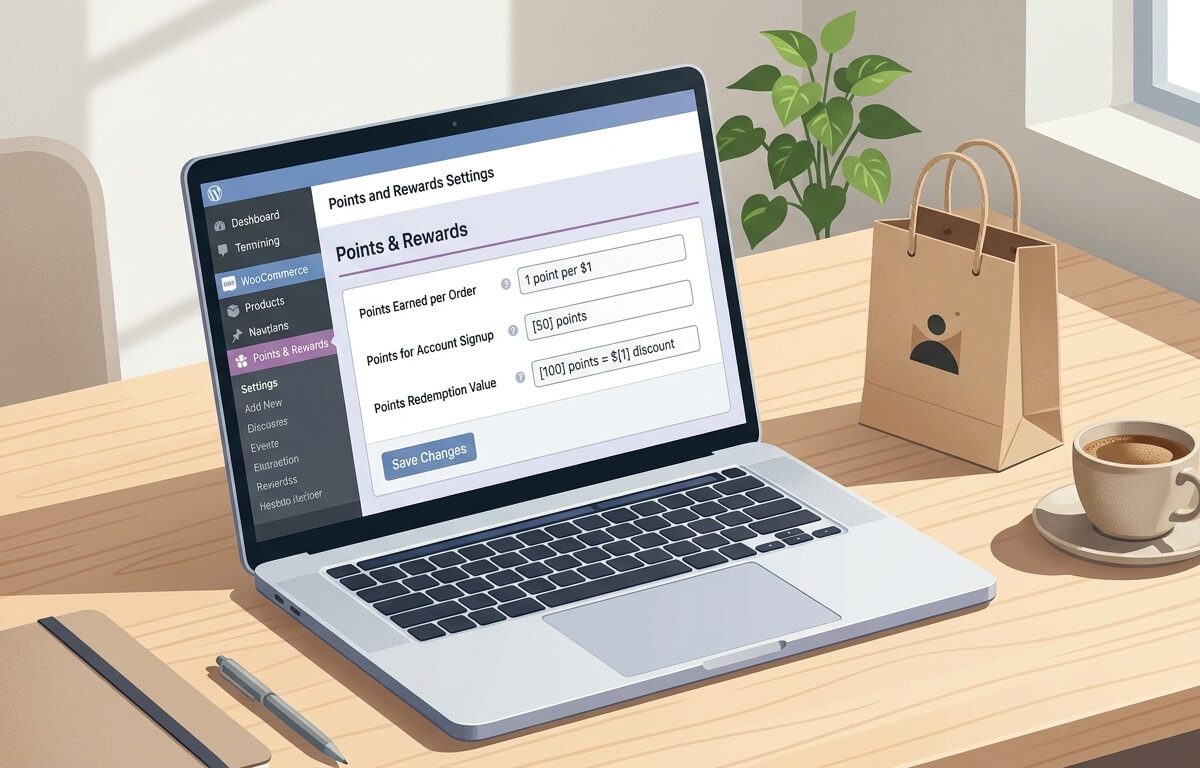
If you are asking how to set up points and rewards in WooCommerce, you are asking about a practical way to give customers a reason to come back. A WooCommerce points and rewards system gives points for defined actions, such as creating an account, placing an order, or logging in. Customers can later use those points for a discount at checkout.
This guide explains how to set up points and rewards in WooCommerce from the first decision to launch. It covers planning, point values, earning rules, redemption, testing, and common mistakes. It also shows how a WooCommerce loyalty points plugin can handle the work, using Vite Rewards as the worked example.
You do not need a large team to do this. You do need a clear point value, simple rules, and a way for customers to see their balance. When those three parts are clear, a WooCommerce points and rewards system is easier to run and easier for customers to understand.
The Problem: Why Repeat Purchases Are Hard Without a Clear Reward
Many stores focus on getting a first order. The harder part is the second and third order. A customer may like a product and still forget the store, compare prices elsewhere, or wait for a sale. Without a clear next step, there is no reason to return at a specific time.
A points-based loyalty program gives that next step. It tells the customer: if you return, you keep building toward a discount. It also gives the store owner a record of what was earned, what was used, and what was returned after a refund.
This is the problem a WooCommerce customer loyalty program solves: it turns one-time buying into a visible balance. The customer can see progress. The store can see which actions lead to repeat orders.
Common signs that a store needs this structure include:
- Many first-time buyers and few repeat buyers
- Customers ask if there is a loyalty program or discount for returning
- Discounts are given by hand, through coupons or manual emails, with no tracking
- Marketing depends on constant sales to bring people back
- There is no simple way to reward signups, logins, or referrals
A WooCommerce points and rewards system does not fix product quality, shipping, or pricing. It helps when the store already works and needs a repeatable way to reward the actions that lead to another order.
What a WooCommerce Points and Rewards System Is
A WooCommerce points and rewards system is a set of rules inside a WooCommerce store. The rules define:
- How points are earned — for example, 10 points for signup, 1 point per $1 spent, or a fixed amount per order.
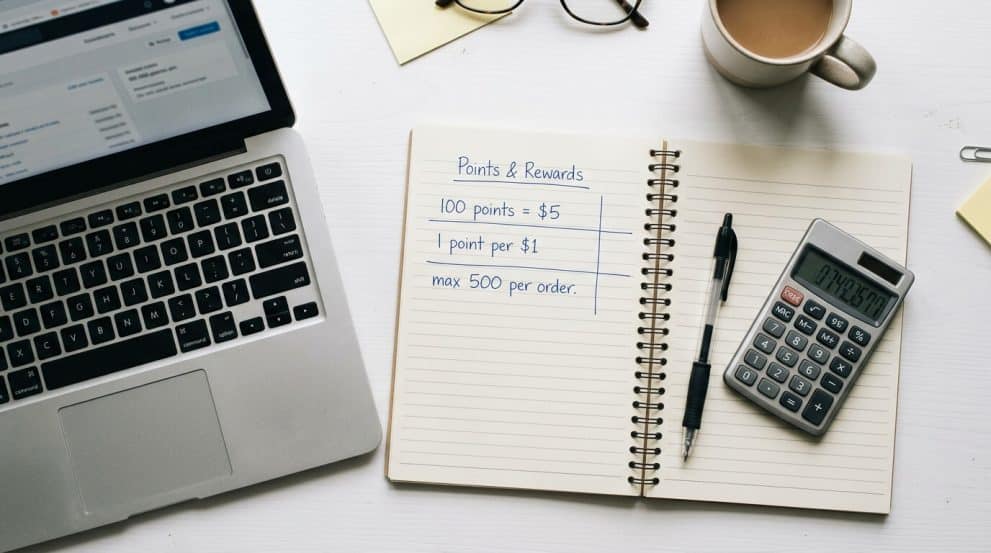
- What points are worth — for example, 100 points = $5 off.
- How points are used — for example, at the cart or checkout, up to a maximum per order.
- What happens on refunds, cancellations, or adjustments — for example, points are taken back or adjusted.
- How customers see their balance — for example, on a My Account page, a points table, or an email.
A points-based loyalty program is different from a simple coupon. A coupon is usually one code for one discount. Points build over time. A customer can earn a little on each visit and use the balance when it reaches a useful amount.
A WooCommerce customer loyalty program can also include non-purchase actions. That is where many stores start. The product page for Vite Rewards lists signup points, daily login points, referral points, per-order points, per-order-amount points, order-amount-range points, and global product points. Those are separate rules. You can turn on one or two at first and add others later.
Why Points Systems Fail: Common Causes
Points systems often fail for practical reasons, not because customers dislike points. The common causes are:
- The value is unclear. Customers do not know what 100 points means in money.
- The rules are too complex. There are too many ways to earn, with different rates and exceptions.
- Redemption is hard to find. Points exist, but customers cannot use them at checkout.
- The minimum is too high. A customer needs to spend far too much before any reward is possible.
- Refunds are not handled. Points stay in the account after a refund, which creates losses and disputes.
- No one explains the program. The store adds points but never tells customers how they work.
- The store gives away too much. The point value is set without checking margin, shipping, and fees.
A good setup avoids these causes. It keeps the math simple, the redemption visible, and the costs checked before launch.
Before You Start: Decisions That Shape the Whole System
Before you install anything, answer five questions. These answers decide your settings later.
1. What action do you want to reward first?
Most stores start with purchases. That is the action that directly relates to revenue. If you want to learn how to reward customers for purchases in WooCommerce, start with a per-order or per-amount rule. Add signup and login points only if you want to reward account creation and return visits.
2. What is one point worth?
This is the core of a WooCommerce points and rewards system. Without a fixed value, you cannot explain the program or control cost.
Example math:
- You decide 100 points = $5 discount.
- That means 1 point = $0.05.
- If you give 1 point per $1 spent, a $50 order earns 50 points, worth $2.50. That is a 5% return in points.
- If you give 10 points per $1 spent, a $50 order earns 500 points, worth $25. That is a 50% return. That is usually too high.
Work backward from the return rate you can afford. A common starting range for many stores is 2% to 5% back in points value, before shipping and taxes, but the right number depends on margin. Check your margin on your typical order before you choose.
3. What is the minimum to redeem?
A minimum stops very small balances from creating checkout work. For example, a customer needs at least 100 points to redeem. That keeps redemption meaningful and reduces support questions about 3-point balances.
4. What is the maximum per order?
A maximum limits how much discount can come from points on one order. For example, a customer can use up to 500 points per order, even if the balance is higher. This protects margin on large orders.
5. How will customers see and use points?
Decide where the balance appears. In WooCommerce, this is often on the My Account page, on a dedicated rewards page, or at cart and checkout. If customers cannot find the balance, they will not use it.
If you are deciding the best way to set up loyalty points in WooCommerce store operations, this planning step is the best place to start. A simple plan now saves rework later.
How to Diagnose Problems in an Existing Setup
If you already have points running and something is wrong, check in this order:
- Is the plugin active and is WooCommerce active? A deactivated plugin or a WooCommerce update can stop earning.
- Are the earning rules enabled? A rule can exist but be turned off.
- Is the customer logged in? Points for signup and daily login require an account. Guest checkout may not earn account points.
- Does the order status match the rule? Some setups award points only after payment or after an order is marked completed. A pending order may not earn yet.
- Is the redemption form visible? Check cart and checkout on both the classic WooCommerce pages and the Gutenberg block pages if you use blocks.
- Is there a points log? The log shows when points were earned, redeemed, or adjusted. If the log is empty, the rule did not run. If the log shows an entry but the balance is wrong, the issue is in the calculation or refund handling.
- Is there a conflict? A caching plugin, a custom theme, or another rewards plugin can hide the redemption form or change checkout behavior.
Write down what you expected, what happened, and what the log shows. That record makes support faster and avoids guessing.
Choosing the Approach: Manual, Built-In, or a Plugin
There are three ways to run a points-based loyalty program in WooCommerce:
- Manual: You track points in a spreadsheet and send coupons by hand. This works for a very small number of customers, but it does not scale and it is easy to make errors.
- Custom code: A developer builds earning and redemption logic. This gives control, but it needs testing, maintenance, and updates for WooCommerce changes.
- A WooCommerce rewards plugin: The plugin handles earning, balance, redemption, logs, and emails. This is the usual choice for most stores because the logic is already built and tested.
A WooCommerce loyalty points plugin is the practical route when you want to learn how to set up points and rewards in WooCommerce without building the system from code. The plugin should let you set the point value, enable specific earning rules, set redemption limits, show a points table, and keep a log.
When you compare a WooCommerce rewards plugin, check these points:
- Can you set different rules for signup, order, amount, and product?
- Can you set a conversion rate and a minimum and maximum for redemption?
- Can customers redeem points in WooCommerce at cart or checkout?
- Is there a points log for the admin and a balance view for the customer?
- How are refunds handled?
- Does it support shortcodes or blocks to show points on a page?
- Does it send email notifications for earning, redemption, or badges?
If a plugin cannot answer those questions clearly, it will be hard to run day to day.
For general background on how points and rewards plugins handle conversion and redemption, see the WooCommerce documentation for points and rewards plugins. WooCommerce documentation: Points and Rewards for WooCommerce by WPGens
The Step-by-Step Guide: How to Set Up a Points & Rewards System from Scratch in WooCommerce
This is the full setup for a new WooCommerce points and rewards system. Follow the steps in order. Test after step 8 before you announce the program.
Step 1: Prepare WooCommerce and a backup
Before you add any loyalty logic:
- Confirm WordPress and WooCommerce are installed and updated.
- Confirm you can place a test order as a logged-in customer.
- Take a backup of the site and database.
- If possible, test on a staging copy first.
This step matters because a WooCommerce points and rewards system touches checkout. A backup lets you restore if a setting or theme conflict appears.
Step 2: Install a WooCommerce loyalty points plugin
For this guide, the example is Vite Rewards. The general install steps for a plugin from WordPress.org are:
- In WordPress admin, go to Plugins > Add New.
- Search for the plugin name, or upload the ZIP file if you have it.
- Click Install Now, then Activate.
- Confirm WooCommerce is active. Vite Rewards is described as a loyalty points plugin for WooCommerce and Vitepos.
After activation, find the plugin menu in the WordPress admin. The product page notes a user-friendly control panel for configuration. Take a few minutes to look at each settings area before you change values.
If you want more background on Vite Rewards and loyalty use cases, see this related post: Elevate Customer Loyalty Program: Free Vite Rewards Integration for WooCommerce Made Easy
Step 3: Set the point value and currency rules
This is the most important setting in a WooCommerce points and rewards system. In Vite Rewards, the settings include per-currency point values, according to the product page. That means you can set different point values for each currency if you sell in more than one currency.
Decide and record:
- How many points equal $1, €1, or your store currency in discount value
- Whether points are based on product total, order total, or order total excluding shipping and tax — check the plugin setting and keep it consistent
- Whether points expire — if the plugin and your plan support expiry, decide the period and state it clearly on your rewards page
Example to use as a starting point, not a rule for every store:
| Setting | Example value | What it means |
|---|---|---|
| Points per $1 spent | 1 point | A $60 product total earns 60 points |
| Points to currency | 100 points = $5 | 1 point is worth $0.05 |
| Minimum to redeem | 100 points | Customer needs $5 in value before redemption |
| Maximum per order | 500 points | Maximum $25 discount from points on one order |
| Return rate | 5% | The value given back as points, before other costs |
Change the numbers to fit your margin. A store with low margin may need a lower return rate. A store with high margin and high repeat potential may allow a higher rate, but still needs a cap.
Step 4: Set how customers earn points
Now turn on earning rules one by one. The best way to set up loyalty points in WooCommerce store setups is to start with a small set, test it, and then add more.
Vite Rewards lists these earning options:
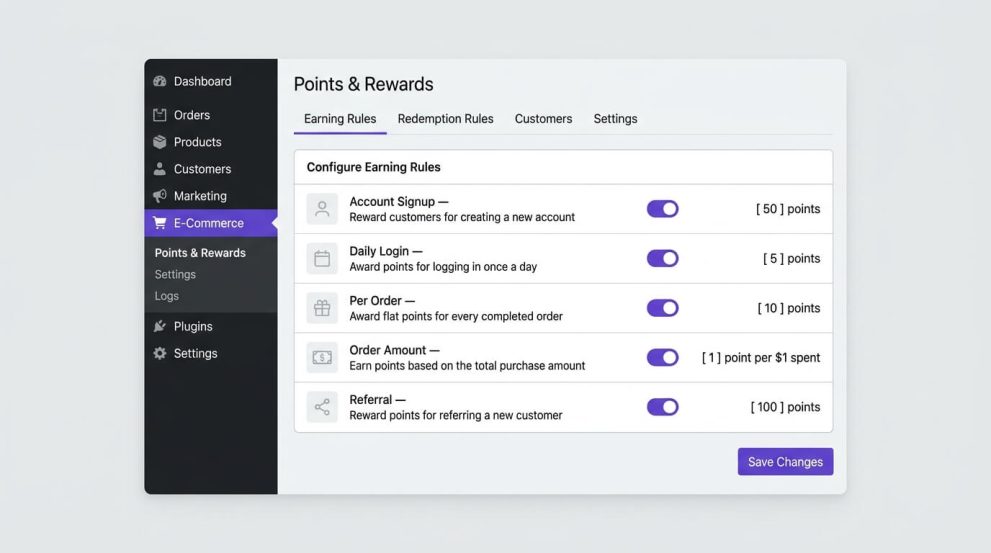
- Sign up rules: Points for creating an account. This is useful if you want to grow registered customers. The product page describes signup points as a way to reward new registrations.
- Daily login rules: Points for logging in daily. This rewards return visits. The product page describes daily login points as a way to encourage consistent engagement.
- Referral points: Points for referring others. Use this only if you have a clear rule for when the referral counts — for example, after the referred customer creates an account or places an order.
- Per order points: A fixed number of points for each order, regardless of amount.
- On order amount points: Points based on the total order amount.
- On order amount range: Different point values for different spending ranges. For example, orders from $50 to $99 earn one amount, orders $100 and above earn a higher amount.
- Global assign product points: Points for buying any product in the store. The product page notes this adds points for every product in an order.
This is where the long-tail question about WooCommerce points for signup and daily login matters. WooCommerce points for signup and daily login are two separate rules. Signup points are given once, when an account is created. Daily login points are given when a logged-in user logs in on a new day. Keep them separate in your settings and in your explanation to customers. If you give too many points for daily login, customers can build a large balance without buying. Set a small daily login value and a clear limit if the plugin allows it.
A simple starting set for many stores is:
- Signup: 50 points, once
- Per order: 10 points per completed order, or 1 point per $1 spent — choose one method for order earning, not both, to avoid double counting
- Daily login: 5 points per day
- Referral: 50 points after the referred customer completes a first order
Write these rules on your rewards page in plain language. Customers should be able to calculate what they will earn before they buy.
If you are still asking how to reward customers for purchases in WooCommerce, the answer is to pick one purchase rule and keep it visible. How to reward customers for purchases in WooCommerce works best when the customer can see the points on the product page, cart, or order confirmation, not only in the admin.
Step 5: Set how customers redeem points
Redemption is where a WooCommerce points and rewards system meets checkout. If this step is unclear, customers will earn points and never use them.
In Vite Rewards, the settings include max redeemed points per order and page settings for where the redemption form appears, including WooCommerce or Gutenberg cart and checkout. The product page also notes shortcodes to display dynamic content such as a redeem points form.
Decide:
- Where redemption appears: Cart, checkout, or both. Test both if you use block checkout.
- How the customer chooses an amount: Does the customer enter points, choose a preset, or use all available points?
- Minimum balance: The customer must reach the minimum before the form is useful.
- Maximum per order: The cap you set in Step 3.
- Whether points can be combined with coupons: Decide this before launch. If points and coupons can stack, check the combined discount against margin. If they cannot stack, state that clearly.
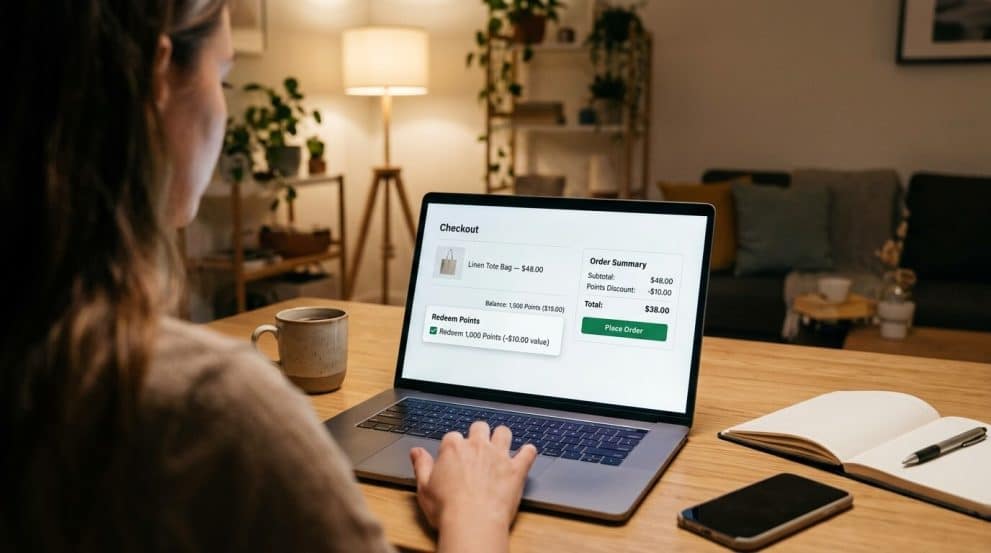
This is also the answer to how to let customers redeem points at checkout in WooCommerce. How to let customers redeem points at checkout in WooCommerce depends on showing a clear redemption control on the cart or checkout page, with the balance, the value, and the remaining balance after redemption. The customer should see the discount before paying, not only after.
Example customer view at checkout:
- Current balance: 320 points
- Value: $16.00
- Customer enters: 200 points
- Discount applied: $10.00
- Remaining balance after order: 120 points, plus any points earned from this order
Test this flow with a test account before launch.
Step 6: Set badges, pages, and shortcodes
Badges give a visual marker for progress. The product page describes badges as a visual symbol for customer achievements, such as earned points or status. In Vite Rewards, badge upgradation is listed as a feature. Use badges only if they help customers understand progress. A badge for a first order, for 500 lifetime points, and for 1,000 lifetime points is enough to start. Too many badge levels add confusion.
For pages and display:
- Create a Rewards / How Points Work page that explains earning, value, minimum, maximum, and refund rules in plain language.
- Add a points table or balance display where customers can see how they earn and redeem points. Vite Rewards lists a reward point table and shortcode support.
- Place the redemption form where the page settings allow — WooCommerce or Gutenberg cart/checkout, as listed on the product page.
- Check the page on mobile. Many customers will check balance and redeem on a phone.
Use shortcodes only where they help. A shortcode on the rewards page to show balance or a redeem form is useful. A shortcode on every product page may clutter the layout.
Step 7: Set email templates and notifications
Customers need to know when points change. Vite Rewards lists pre-designed email templates to update customers on sign-ups, order completion, point redemption, or badge updates.
Set up at least these messages:
- Signup: You earned X points for creating an account. Here is what points are worth and where to see your balance.
- Order completed: You earned X points for this order. Your new balance is Y.
- Redemption: You used X points for $Y off. Your remaining balance is Z.
- Badge earned: You earned a new badge for reaching a milestone.
Keep the emails short. Include the balance, the value, and a link to the rewards page. Do not send an email for every login if daily login points are small — that can create too many messages. A weekly summary may be better for login points, if your email setup allows it.
Step 8: Set refund and cancellation handling
This step protects the store. Vite Rewards lists refund point management: points are returned or adjusted if an order is canceled or refunded.
Decide and test:
- If an order is refunded in full, are the points earned from that order removed?
- If an order is partly refunded, are points reduced in proportion?
- If points were used for a discount and the order is refunded, are the used points returned to the customer?
- Who can adjust points manually, and is there a log entry for the adjustment?
The user points log is important here. The product page describes the log as a record of all point-related activities, showing when points are earned, redeemed, or adjusted. Check the log after a test refund. The log should show the original earning, the refund adjustment, and the final balance.
Step 9: Test the whole WooCommerce points and rewards system
Test as a customer, not only as an admin. Create a test customer account and run through these cases:
- Create an account — check signup points appear.
- Log in the next day — check daily login points, if enabled.
- Place an order — check per-order or per-amount points appear after the order reaches the status you set.
- Check the balance on My Account or the rewards page.
- Place a second order and redeem points at checkout — check the discount, the remaining balance, and the order total.
- Refund the second order in the admin — check that points are adjusted in the log.
- Check emails for signup, order, redemption, and refund.
- Check the cart and checkout on mobile and on desktop.
- Check the Gutenberg block checkout if your store uses it, and the classic checkout if you still use it.
- Check that a guest checkout does not create a confusing points balance.
Fix any step that does not match your rewards page. Do not launch until the test log matches the rules you will publish.
Step 10: Launch, explain, and monitor
Launch with a short announcement on the rewards page and in the order confirmation email. Do not rely on customers discovering points by chance.
In the first weeks, monitor:
- How many customers earn points
- How many redeem points in WooCommerce at cart or checkout
- The average points earned per order and the average discount from redemption
- Refund adjustments in the log
- Support questions about points
If customers earn but do not redeem, the minimum may be too high or the redemption form may be hard to find. If too many points are redeemed at once, the maximum may be too high. Adjust one setting at a time and note the change.
Using Vite Rewards as the Product-Based Solution
Vite Rewards is a WooCommerce loyalty points plugin designed for WooCommerce and Vitepos. The product page describes it as a loyalty points plugin that rewards customers for various actions and interactions. It is a relevant option when you want to set up a WooCommerce points and rewards system without building the logic yourself.
What it provides, based on the product page and WordPress.org listing:
- User reward rules: Signup, daily login, and referral points.
- Order reward rules: Per order points, on order amount points, on order amount range points, and global assign product points.
- Reward point table: A structured view of points for different actions.
- Badges: Visual markers for achievements based on points.
- Email templates: Pre-designed templates for signup, order completion, point redemption, and badge updates.
- Shortcodes and Gutenberg block support: Ways to display points content on pages, cart, and checkout.
- User points log: A record of earned, redeemed, and adjusted points.
- Reward point settings: Per-currency points, max redeemed points per order, refund point handling, and page settings.
- Client point portal: A place for customers to view balance, history, and rewards, as listed on WordPress.org.
- Vitepos integration: The product page notes integration with Vitepos and WooCommerce for unified handling across retail and online stores.
If you use Vitepos for in-store sales, this integration is worth checking. A customer who earns points online should see a consistent balance in-store, and vice versa, if your setup supports it. Test this flow before you tell customers it works both ways.
You can learn more on the product page: Vite Rewards
For a broader view of customer rewards programs, see: Why Your Store Needs a Customer Rewards Program: Unlock Loyalty, Boost Sales, and Delight Customers
A second external source on loyalty points and Vitepos integration is: Vitepos: Revolutionize Customer Loyalty Points — Integrate Vite Rewards Pro with WooCommerce and Vitepos
Example: A Simple Program You Can Copy and Adjust
Here is a complete example for a store with an average order value of $65 and a gross margin that allows a 4% return in points.
Earning:
| Action | Points | Notes |
|---|---|---|
| Signup | 50 points | Once per account |
| Daily login | 5 points | Once per day, logged-in users only |
| Per $1 spent | 1 point | Based on product total, not shipping or tax, if that matches your setting |
| Referral | 50 points | After referred customer completes first order |
| Per order bonus | 0 points | Not used in this example, to avoid double counting with per $1 |
Value and limits:
| Setting | Value |
|---|---|
| 100 points = | $5 discount |
| Minimum to redeem | 100 points |
| Maximum per order | 400 points ($20) |
| Refund | Earned points from refunded order are removed; used points are handled per your refund rule |
Customer journey:
- Customer signs up and gets 50 points.
- Customer buys $65 and earns 65 points. Balance is now 115 points.
- Customer logs in the next day and earns 5 points. Balance is 120 points.
- Customer places a second order for $40. The customer redeems 100 points for $5 off. The order total is reduced by $5. The customer earns 40 points for the $40 purchase, depending on whether earning is based on the pre-discount or post-discount total — check your setting and state it on the rewards page.
This example shows why a WooCommerce points and rewards system needs a clear rule for earning on discounted orders. If you earn on the post-discount total, the customer earns slightly less after redemption. If you earn on the pre-discount total, the customer earns more. Both can work, but the rule must be consistent and explained.
Common Mistakes to Avoid
- Setting points without checking margin. A high point value can turn a profitable order into a loss after shipping and fees. Check margin first.
- Using two purchase rules at once. Per-order points plus per-amount points plus global product points can stack in ways you did not plan. Start with one purchase rule.
- Making the minimum too high. If a customer needs five orders before any reward, many will stop caring. Make the first reward reachable.
- Hiding redemption. If the redeem control is only on one page, or only on desktop, customers will miss it. Test cart and checkout, classic and block versions.
- Forgetting refunds. If refunded orders keep points, the store loses money and the log becomes unreliable.
- Giving too many login points. Daily login is useful for visits, but it should be small compared with purchase points. Otherwise, points grow without purchases.
- Changing rules without notice. If you change the value or minimum, tell customers before it applies and keep the old rules for points already earned, if possible.
- No rewards page. Customers need one page that explains earning, value, minimum, maximum, and refunds. Without it, support questions increase.
- Not testing guest checkout. Guests may not earn points in the same way as logged-in customers. State this on the rewards page.
- Adding too many badges or tiers at launch. Start with a few clear milestones. Add more only after the basic system runs well.
Additional Tips for Running the System After Launch
- Keep the language simple. Use “points” in the same way everywhere — on the product page, cart, checkout, emails, and rewards page. Do not switch between “credits,” “coins,” and “points” unless you mean different things.
- Show the value, not only the points. “120 points = $6 off” is clearer than “120 points.”
- Review the log weekly at first. Look for unusual earning, large redemptions, or refund gaps.
- Watch for abuse. Examples include creating many accounts for signup points, or using referrals that never buy. If you see this, tighten the rules — for example, require a completed order before referral points are given, and limit signup points to one per person.
- Keep the program visible but not noisy. A banner on the rewards page, a line on the order confirmation, and a balance on My Account are enough for most stores.
- Coordinate with coupons. If you run a sale with coupons, decide whether points can be used on top of the coupon. Test the combined total.
- Check multi-currency if you sell internationally. If you use per-currency points, test each currency you support.
- Back up before changes. Any change to point value, minimum, or maximum should be tested on staging first.
- Document your rules. Keep a short internal note with the exact settings, the date they changed, and why. This helps when you review performance later.
When Professional or Technical Help May Be Required
Most stores can set up a WooCommerce points and rewards system without a developer. Get help when:
- The theme heavily customizes cart or checkout and the redemption form does not appear.
- You use a custom checkout flow, a headless setup, or a page builder that changes WooCommerce templates.
- You need to sync points across WooCommerce, Vitepos, and another system, and the standard integration does not cover your flow.
- You sell in many currencies with different tax rules and need to confirm how point value is calculated for each.
- You need to migrate points from an old loyalty system and keep balances and history.
- You see errors in the log, duplicate points, or points that do not match order totals, and basic checks do not fix them.
In those cases, ask a developer or the plugin support team for help, and share the exact steps, the order number for a test order, and what the log shows. That detail speeds up diagnosis.
FAQ
Start with a plan for point value, minimum, and maximum. Install a WooCommerce loyalty points plugin such as Vite Rewards, set the conversion rate, enable earning rules for signup, order, and login, set redemption at cart or checkout, set refund handling, and test the full flow as a customer. This is how to set up points and rewards in WooCommerce without building the logic from code.
The best way to set up loyalty points in WooCommerce store setups is to keep it simple: one purchase rule, a clear point value, a reachable minimum, a cap per order, and a visible redemption form. Test the flow, publish a rewards page, and add more rules only after the basic system works. This approach also answers how to set up points and rewards in WooCommerce for stores that want a low-risk start.
Use a per-order rule or a per-amount rule. For example, give 1 point per $1 spent, or a fixed number of points per completed order. Choose one method to avoid double counting. This is how to reward customers for purchases in WooCommerce in a way customers can calculate before they buy.
In most setups, yes for signup, daily login, and referral points, because those actions require an account to track. Guest orders may not earn account points. State this on your rewards page. If you want guests to earn, check whether your plugin supports it and how the balance is stored.
In a well-set system, points earned from a refunded order are removed or adjusted, and points used for a discount are handled per your refund rule. Check the user points log after a test refund to confirm the behavior. Vite Rewards lists refund point management for canceled or refunded orders.
Vite Rewards is described as integrating with WooCommerce and Vitepos. If you use Vitepos for in-store sales, test whether points earned online and in-store share the same balance before you announce combined earning.
Use one rewards page with: how to earn, what points are worth, minimum to redeem, maximum per order, where to redeem, and what happens on refunds. Include an example with real numbers from your store. Link that page from My Account, the cart, and order emails.
Conclusion
A WooCommerce points and rewards system works when the rules are simple, the value is clear, and redemption is easy to find. Start with a plan for point value, minimum, and maximum. Set one purchase rule, add signup and daily login points if they fit your goals, and set clear refund handling. Test the full flow as a customer, from signup to redemption to refund, before you launch.
If you want to run this with a plugin, Vite Rewards provides the earning rules, redemption controls, points log, badges, email templates, and page settings described in this guide. Use the steps above to set it up, publish a clear rewards page, and review the log in the first weeks. That is how to set up points and rewards in WooCommerce in a way that stays accurate for customers and manageable for the store.